
Fitbit Flex Review


Fitbit Flex

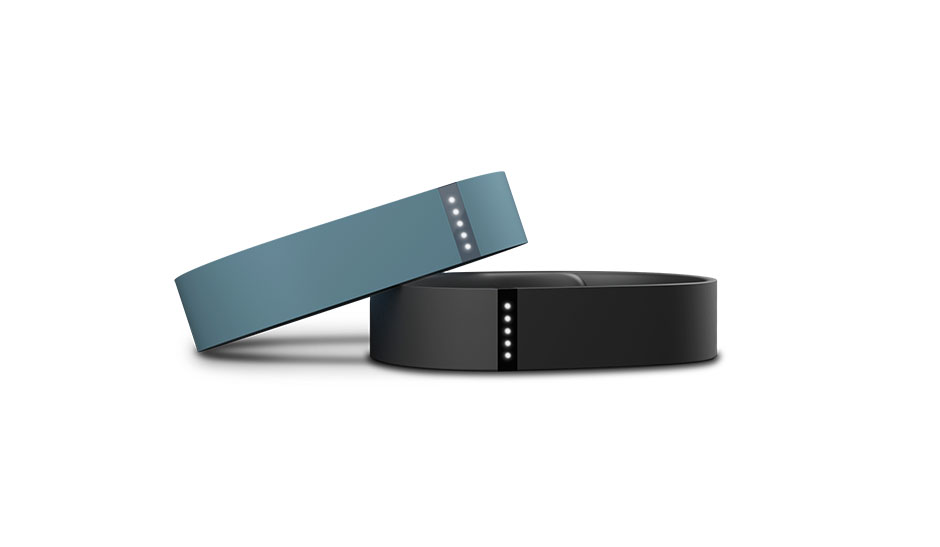
Fitbit Flex Photo, from the Fitbit website

If you’re someone who is interested in health and fitness, particularly when it comes to tracking and viewing information about your daily activity, perhaps you should consider checking out the Fitbit Flex, a wearable device that enables you to keep track of your daily activity, as well as other information, such as sleep, calories burnt, and more.

I’ve actually had the Fitbit Flex for a while now and have enjoyed being able to keep track of my daily activity and occasionally my sleep.

Hardware

The Fitbit Flex comes with the tracker itself, two rubber bracelets (a small and a larger size), a metal “clasp” that is interchangeable between bracelets, a USB charging dongle, and a USB receiver that can be used to sync the tracker with a desktop or laptop via Bluetooth.

The tracker is small, made of a hard plastic, and features five LED lights toward the top of the unit, which are used to show one’s progress throughout the day, as well as whether or not the device is in sleep mode. Other than that, however, there is no other display of information on the device itself.
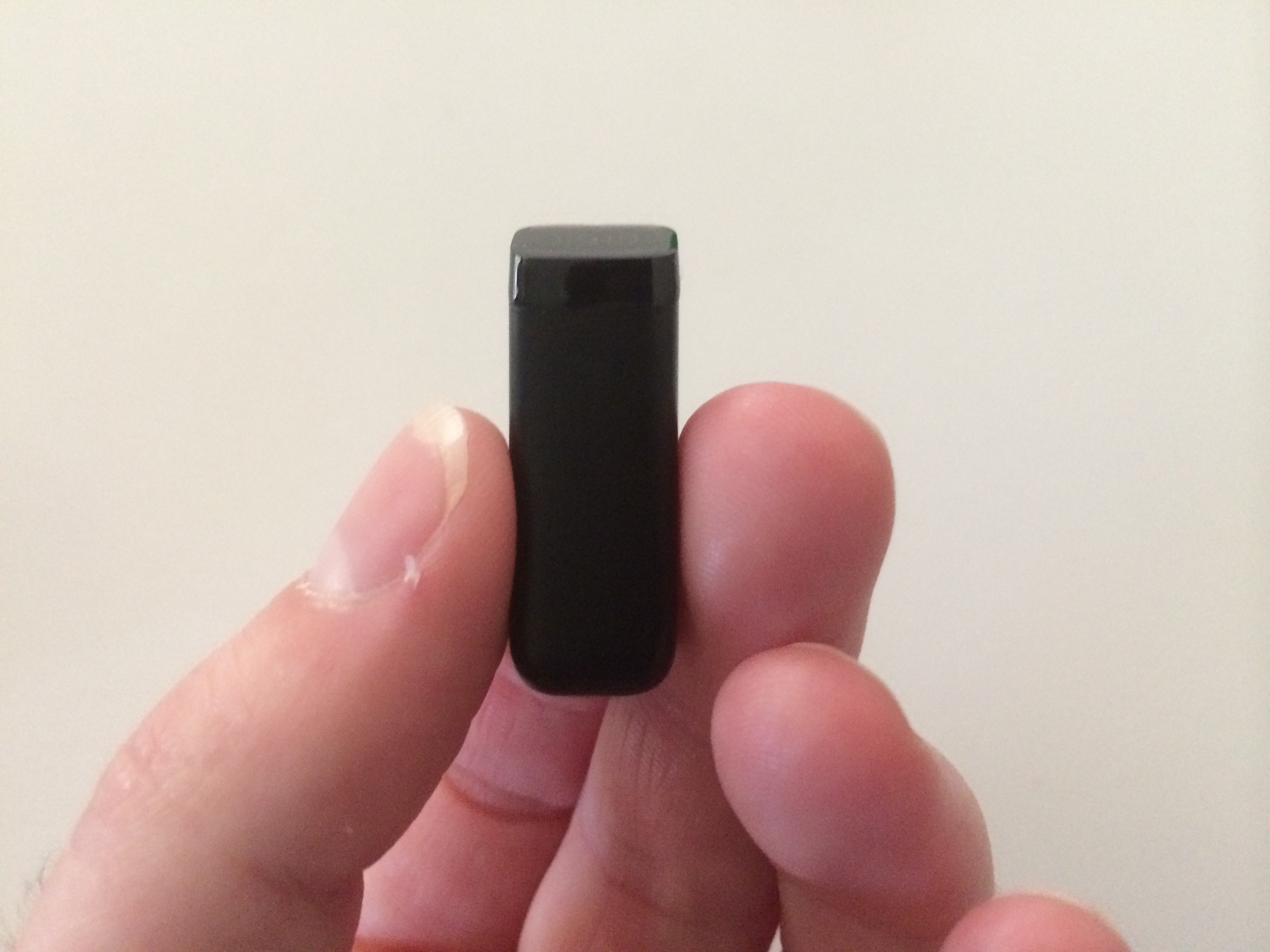
Fitbit Tracker

Actual Fitbit Tracker

The tracker unit itself records information using a MEMS 3-axis accelerometer, which is able to track your wrist motion, interpreting it into the number of steps that were taken, how far you traveled, and how well you slept. Additionally, the tracker includes a vibration motor, which is used to alert you when you reach your daily goal, as well as when the device goes into and out of sleep mode.

The Fitbit Flex’s tracker has a lithium-ion battery that can last for around five days, though I have been able to get longer out of the device with less frequent use. (I don’t usually wear the device all day, which may contribute to the battery lasting longer.) The battery can be charged using the included USB charging dongle, which can be plugged into a computer’s USB port or a wall-adapter (which I tend to use) for a device like an iPhone, etc.
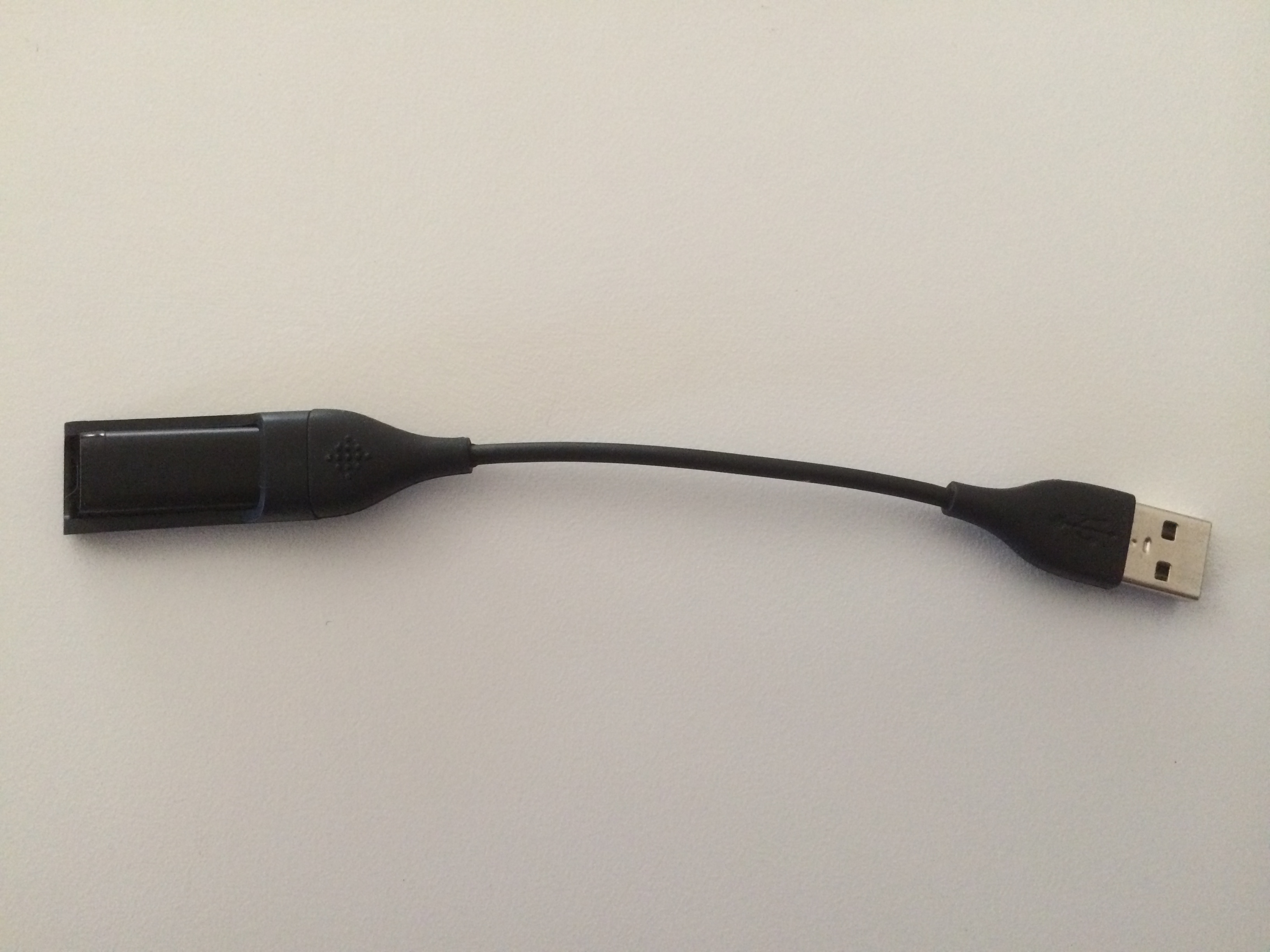
Fitbit Flex Tracker in the included charging dongle

Fitbit Flex Tracker in the included charging dongle

When charging, the Flex’s LED lights will light up to indicate the battery’s charge level. Once all five LED lights are lit up, the tracker is fully charged.

The Flex’s tracker also features Bluetooth 4.0, which can be used to communicate with certain cell phones, such as the iPhone and select Android devices, as well as with the small USB Bluetooth receiver that comes with the device.

The Fitbit Flex is also water resistant, up to 10 meters (32.8084 feet), you can wear it all day, including when showering, washing your hands, or possibly even swimming. While I have not worn the Fitbit in the shower, I have worn it while washing my hands and it has held up pretty nicely.

One issue that you may encounter (though this has never really been a problem for me) is that water may end up collecting in the rubber band, where the tracker sits. However, since the device is water resistant, this should not be much of a problem.
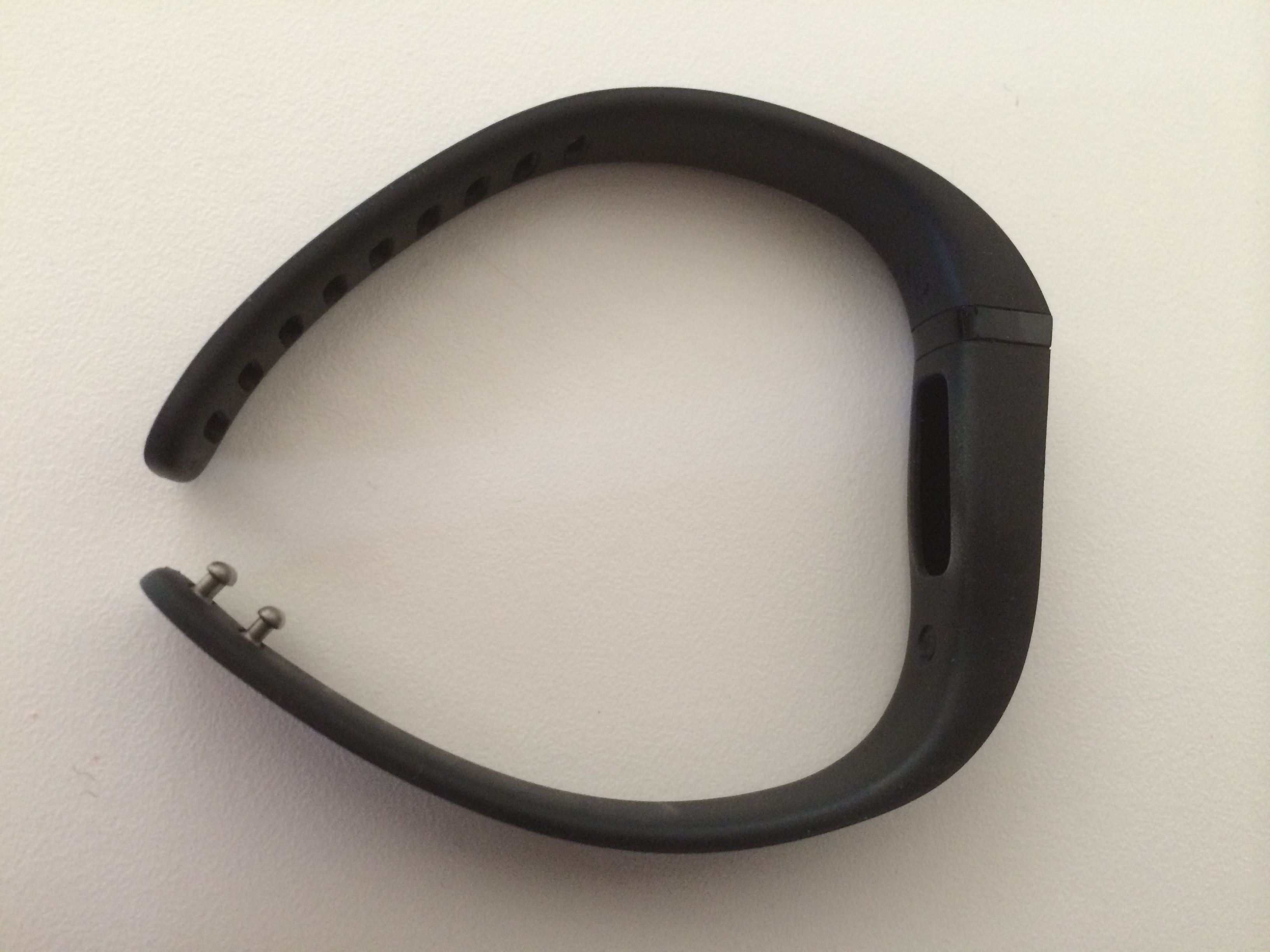
FitBit Flex wristband, showing clasp and where the tracker fits into the wristband.

FitBit Flex Wristband, showing clasp and where the tracker fits into the wristband.

I purchased the Fitbit with the black wristbands, and while it looks nice and is comfortable while on your wrist, you can occasionally notice scratches and scuffs on the wristband. However, they are not major (at least the ones I have managed to get) and can usually be rubbed off, or at least made less noticeable.

Features

The Fitbit Flex, while it may look simple on the outside, includes many features that make it worth the $99.95 price tag.

The Fitbit Flex records wrist motion using its accelerometer and converts it into the number of steps that were taken, the number of calories burned, the distance that has been traveled throughout the day, as well as how one slept.

As far as accuracy is concerned, the Flex seems to be fairly accurate, though since it is worn on your wrist, faster motions, like brushing your teeth, using a cash register, or just moving your wrist a lot, may be counted as steps. However, I don’t really see these as making too big of a difference in your overall activity level, even though it may skew the results a bit.

The Fitbit Flex’s tracker features five LED lights, which are used to display how close to meeting your daily goal you are. Each of the five LED lights represents 20% of your daily goal, which you can set within the Fitbit iPhone or Android application or on the Fitbit website.
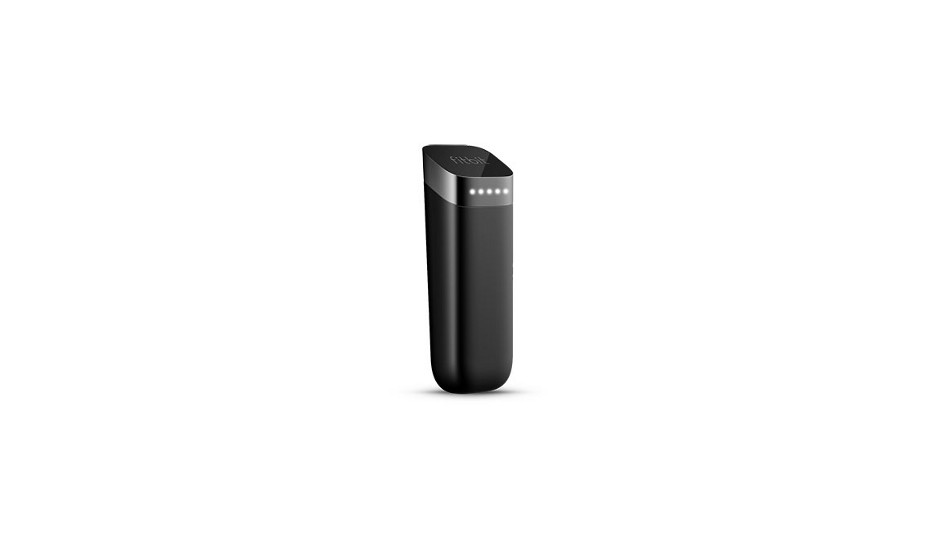
FitBit Flex Tracker with LED lights illuminated

FitBit Flex, with LED lights illuminated. (From the Fitbit website)


In order to activate the LED lights so that you can view your progress toward your daily goal, you can simply tap on the tracker two times, which will illuminate the appropriate number of LEDs, showing your progress.

In order to put the tracker into sleep mode, you can quickly tap on it a number of times, until it vibrates, at which point two LEDs will light up. The LEDs actually resemble two eyes and will flash back and forth, showing you that the device is in sleep mode.

After that, if you tap the device twice to view your progress, you will instead see that it is in sleep mode, as it will display the aforementioned two LEDs lit up. To take the device out of sleep mode, can tap the device rapidly again until it exits and returns to its regular tracking mode.

Applications, Data, and Connectivity

In order to view data on how active one has been throughout the day, you have to either use the Fitbit iPhone or Android application, or the Fitbit.com website, both of which allow users to view the information explained above, such as the number of steps taken, distance travelled, calories burnt, in addition to others.

The Fitbit Flex has two different syncing modes when it comes to the app – one where you can sync your data when the app is open and one where the data continuously syncs in the background, provided you have Bluetooth enabled on your phone.

Once you have synced your data to your phone or computer, you can view it on the app or Fitbit website, which features some nice graphics and other information regarding your activity.

You can also view your activity and other information over time, such as weekly, monthly, or even yearly, should you want to see how active you have been compared to other periods in time.

If you are unable to sync your Fitbit Flex with your phone or computer for a while, you don’t have to worry, as the device can hold up to seven days worth of minute-by-minute data about your activity and sleep. It can also hold your daily total for 30 days, in addition to summaries of your daily number of steps taken, calories, and distance traveled.

Another nice feature is that you can add friends and compare your totals and other information against your friends. If you’re someone who’s competitive, this may  be something that can help both you and your friends stay active, as well as have some fun by competing with each other.

Fitbit also sends out a weekly e-mail that includes a summary of your weekly activity and other information. The e-mail will also contain stock-market like arrows that show whether or not you have increased or decreased the amount of activity, steps taken, calories burnt, and distance traveled, which is always interesting to see.

Personal Thoughts, Experiences, and Impressions

Since I’ve owned the Fitbit Flex for a while now (about two months or so), I have enjoyed being able to see how active I am. Though I don’t usually wear it all day, or even everyday, I like that I can throw it on before I go to work, etc. and see how active I was during that time.

The wristband is comfortable to wear, even if you are wearing a shirt over it, and it is lightweight so you don’t really notice that it’s there most of the time. It’s also easy to use and the app makes getting the information simple and easy. The tracker only takes a few seconds to sync with the app on your phone, which is nice, and when you have the app open, it syncs in almost real time, too, which is nice if you happen to be moving around when you’re viewing the information.
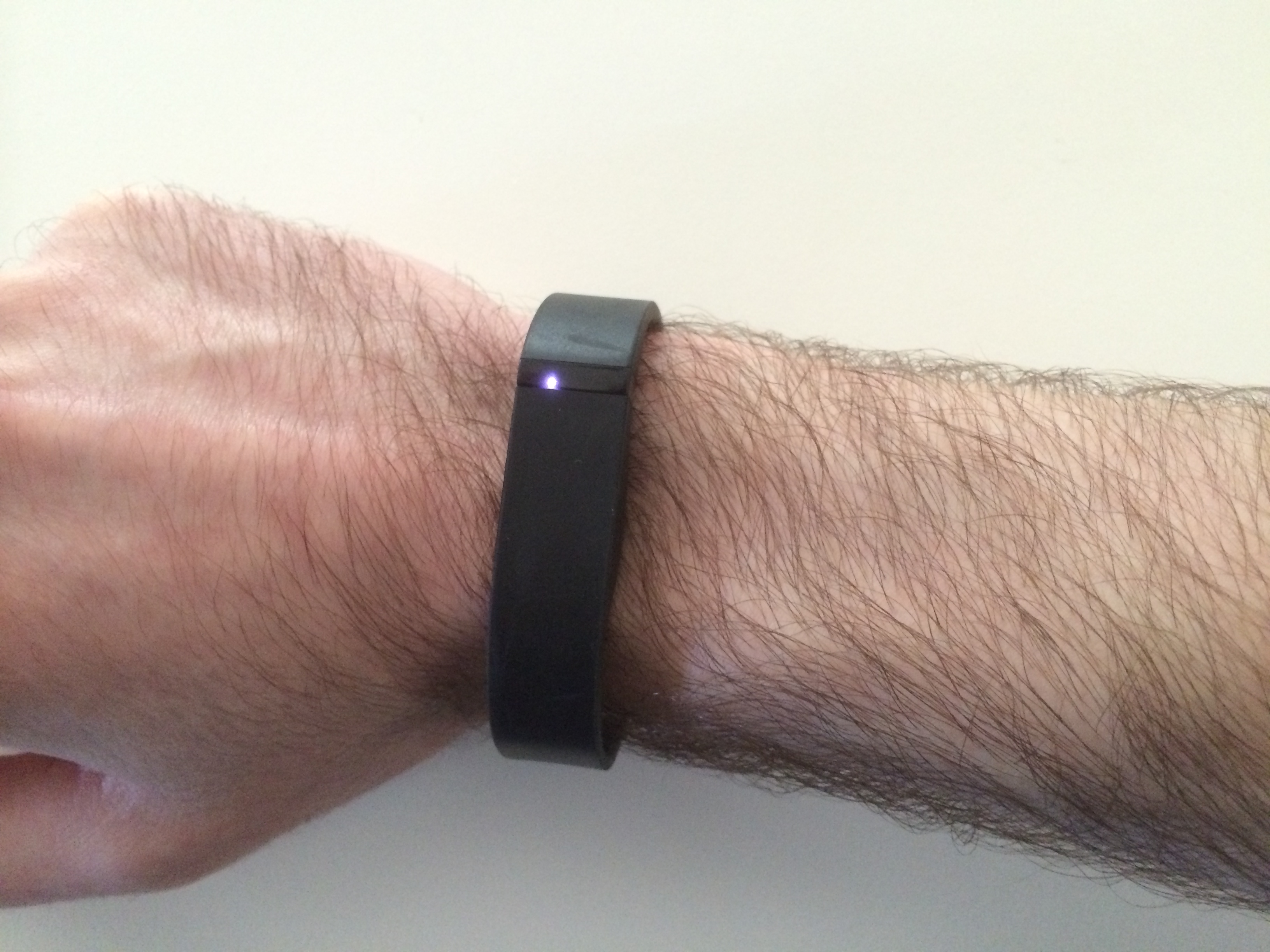
Me wearing the FitBit Flex

Me wearing the FitBit Flex

I tended to wear the Flex more often when I first got it, and after a while the novelty of it started to wear off, but I still do like to wear it and see how many steps I have taken and how far I’ve walked throughout the day.

The sleep tracking functionality of the device is also a nice feature, and it is interesting to see how well you slept throughout the night. This feature seems to be pretty accurate as well, though perhaps a bit less so than the actual step tracking capabilities of the device.

For example, if you go to bed and are laying down watching TV or using your phone and aren’t moving very much, the Fitbit Flex may record that time as you being asleep. However, there doesn’t really seem to be another way to track sleep other than with motion right now, so that’s not a big deal.

Overall, if you are interested in seeing how active you are throughout the day, and are interesting in seeing how well you sleep during the night, you may want to consider purchasing the Fitbit Flex, which is priced at $99.95 and can be purchased from the Fitbit website, as well as stores like Best Buy, Target (where I bought mine), and other retailers.

If you have a Fitbit Flex or other wearable fitness tracking device, what do you think of it? How do you like using it? Do you have any comments on it that aren’t included in this review? Please feel free to post your thoughts and opinions below!

Additionally, if you like what you see on the TechnicalCafe.com website, I invite you to check out the TechnicalCafe YouTube channel, which features a programming tutorials and other computer and technology related videos.


2013 in review

The WordPress.com stats helper monkeys prepared a 2013 annual report for this blog.

Here’s an excerpt:

A New York City subway train holds 1,200 people. This blog was viewed about 6,200 times in 2013. If it were a NYC subway train, it would take about 5 trips to carry that many people.

Click here to see the complete report.

Favorite Apps 2013

Since today is the last day of 2013, I figured it would be appropriate to write a blog post about some of my favorite iPhone apps that I have been using over the past year, as well as some of the apps that have been popular over during 2013, as well.

In no particular order, here is my list of my favorite iPhone apps of 2013:

Tweetbot 3 by Tapbots

$4.99 – iPhone/iPod Touch

Tweetbot 3 is the latest version of a Twitter application that enables users to view tweets from multiple timelines, as well as view and reply to tweets using various gestures throughout the app. Additionally, Tweetbot features nice graphics and aesthetics, with the option to view your timeline(s) in either a lighter “daytime” theme and a darker “nighttime” theme.

Instagram

Free – iPhone/iPod Touch/iPad | Android

Another app that has appeared on this list in previous years, Instagram is a social photo-sharing application that enables users to post photos for their followers and other users to like and comment on. Recently, in the most recent version of the app, users were given the ability to send photos to other users directly, and before that, and earlier in the year, the ability to post videos to their Instagram account.

Snapchat by Snapchat, Inc.

Free – iPhone/iPod Touch/iPad | Android

Snapchat is a popular app, that enables users to send photos and short video clips to one another, with the option to add text and drawings to them. Recently, Snapchat Stories were added to the app, which allows users to post multiple photos to their “Stories”, which are available for a period of 24 hours, unlike a regular Snapchat, which only lasts for up to 10 seconds.

YouTube by Google, Inc.

Free – iPhone/iPod Touch/iPad | Android

The official YouTube application essentially “replaced” the previous YouTube app, created by Apple, that came as one of the pre-installed apps on iOS 6. The YouTube app lets users sign in with their Google or YouTube accounts, as well as view, comment on, and like or dislike videos from the users that they are subscribed to, and also offers suggested videos, like the YouTube website does. Additionally, users can view their YouTube channels and even use the “Capture” app (or the iOS camera app) to record and upload videos to YouTube, as well.

Tinder by Tinder, Inc.

Free – iPhone/iPod Touch/iPad | Android

Tinder is a social/dating application that allows users to “meet” new people by displaying a photo of a user, and allowing them to either swipe right and “like” the user, or swipe left and “dislike” the user. If two users swipe right or “like” each other’s profiles, they will be matched and given the ability to chat with each other within the app.

Additionally, Tinder enables users to post multiple photos to their profiles, should users wish to view more about a user, as well as displays some text and what the two users have in common. Most of this information, including photos and common interests is taken from users’ Facebook profiles.

Plants vs. Zombies 2, by PopCap

Free- iPhone/iPod Touch/iPad | Android

The second version of the popular tower-defense game, Plants vs. Zombies 2 is a game where the goal is to prevent hoards of zombies from attacking your house. In order to do this, users can plant a variety of plants, each with their own abilities (some shoot peas, others freeze the zombies, etc.), in order to deter and kill the zombies before they gain access to your house.

Plants vs. Zombies 2 adds some new features, including power-ups, new plant and zombie types, and more, with the ability for users to purchase coins and other features via  in-app purchases, which can be used to buy more power-ups, unlock new areas, unlock new plants, and more!

Mint by Mint.com

Free – iPhone/iPod Touch/iPad | Android

The Mint app, as well as the Mint.com website, both of which are owned by Intuit, Inc., are two great tools that enable users to view and manage their personal finances.

Mint enables users to connect their bank, credit card, and other types of accounts to their accounts on the Mint website, where they can then view their spending using a variety of useful tools, including graphs, and also enables users to create and manage budgets, as well as see where their money has been spent over time. Mint does not allow users to actually “move” or access their money, but is a useful tool to help users manage their personal finances.

NetFlix by NetFlix, Inc.

Free – iPhone/iPod Touch/iPad | Android

While I’m sure most people are familiar with NetFlix and their great streaming service, I figured I would include this app on the list of my favorite apps of 2013 because it can be quite useful for watching movies and TV shows, especially if you are traveling or not around a TV, or if you, like me, can’t really see a TV without wearing your glasses!

The NetFlix app works with NetFlix’s streaming service, which costs $7.99 a month, and enables users to watch a variety of movies, documentaries, TV shows, and more! (If you want a free trial of NetFlix, you can go to http://netflix.com/woody!)

Dropbox by Dropbox

Free – iPhone/iPod Touch/iPad | Android

Dropbox is another app that is probably more well-known, but is still an app that is useful for storing files between multiple computers and devices, including iOS and Android devices. With Dropbox, if you want to make a file accessible to your variety of devices, you can do simply by placing it in your “Dropbox” folder, which will store it in the cloud and make it accessible across all of your devices via the Dropbox app or web interface.

Dropbox provides 2 GB of storage space for free accounts (with the ability to have up to 16 GB of space for free), and offers plans that allow more storage, starting at $9.99 a month. There are also business plans available, starting at $15 per user.

Calcbot by Tapbots

[Price] – iPhone/iPod Touch/iPad

Calcbot is a calculator app for iOS devices that is a great alternative to Apple’s Calculator app that comes with iOS. Calcbot features the ability to view and use past expressions and calculations or answers, as well as perform a variety of standard and scientific calculations and operations.

Do you have any experiences with these apps? Are there any apps that you like that were not included? If so, please feel free to let us know what you think in the comments!

I hope everyone has a happy, healthy, fun, and safe new year!

Amazon Prime Air

Amazon, known for being one of the Internet’s most popular retailers, has recently reveled a new method of delivery, known as Amazon Prime Air, which is different than any shipping method seen before, from either online or brick-and-mortar retailers.

What makes Amazon Prime Air different than most shipping methods seen before is that this service will use flying drones to deliver packages to customers, with the goal of delivering packages to customers in 30 minutes or less.

Below is a video that describes the Amazon Prime Air service, that even shows an example of what a drone may look like in action.

However, due to FAA rules that are not yet in place, one should not expect to see the Amazon Prime Air drones flying around just yet. According to the FAQ on the Amazon Prime Air webpage, Amazon says “We hope the FAA’s rules will be in place as early as sometime in 2015. We will be ready at that time.”

As for the safety aspect of having drones flying around, delivering packages to Amazon customers, the aforementioned FAQ also states “The FAA is actively working on rules and an approach for unmanned aerial vehicles that will prioritize public safety. Safety will be our top priority, and our vehicles will be built with multiple redundancies and designed to commercial aviation standards.” It is good to know that Amazon is taking steps to help ensure the safety of those who may happen to witness a drone flying by, delivering an Amazon order to a customer.

The Amazon website does not appear to have any information about the pricing of a delivery that uses a flying drone, but it will be interesting to see if there is an extra charge, and if so, how much this charge will be, in order to have something shipped via an Amazon Prime Air drone. Though, the convenience of having something at your door in a half hour or less is something that I would guess many people would be willing to pay extra for!

While the Amazon Prime Air service is not quite yet ready (or allowed) to be rolled out, it is still quite an interesting concept and it will be interesting to see how it ends up working out. Though, the idea of ordering something from Amazon.com and having it at your doorstep in 30 minutes or less is pretty nice and probably something that one would like to have!

CryptoLocker Trojan

While listening to an episode of the computer security podcast, “Security Now!”, hosted by Leo Laporte and Steve Gibson on the TWiT Netcast Network, I found out about the CryptoLocker trojan, which has been pretty troublesome to those who’s computers happen to get infected with it.

CryptoLocker Background:

CryptoLocker is the name of a trojan horse that has recently surfaced, within the last few months, and has been causing some interesting issues for those who have been unlucky enough to have had their computers infected with this piece of malware, as it actually can encrypt some of the contents of a user’s hard drive, making it virtually impossible for them to access this encrypted data unless they choose to pay a ransom that has been set by the developers of the trojan.

Specifically, the CryptoLocker trojan encrypts the infected hard drive’s files using RSA public-key cryptography, with the only key available to decrypt the data being stored on the servers that control the CryptoLocker trojan. Making matters worse is that users must pay in order to have their files decrypted, with payment types such as Bitcoin or a pre-paid voucher, and users must make this payment by a specific deadline. (According to Bitcoincharts.com, the price of a Bitcoin at the time of this posting is equal to around $954.34 US dollars!)

Should a user not make the ransom payment by the set deadline, they may still have the option to get their data unencrypted, but the price will be higher than that which was set before the deadline expired.

Although it is possible to scan for and remove the actual CryptoLocker trojan, if it is activated, thus encrypting one’s files, before the program is scanned for and removed, any files that were encrypted will remain encrypted, so a user essentially has no choice but to pay the ransom, unless they have previously backed up their files and can restore them.

Prevention and Dealing with Infection:

Like many computer viruses and other malicious files and programs, it is possible to essentially prevent one’s computer from being infected with programs like CryptoLocker, simply by being security conscious and taking some basic precautions.

Since CryptoLocker can infected computers via an infected ZIP file, sent to the user in an e-mail attachment, it is important to be cautious as to what e-mails and attachments one opens, especially if they appear to be from an e-mail address that you have never seen before or that looks weird or suspicious.

Many spam e-mails (and those that are infected with viruses and such) may appear as though they are from legitimate sources, such as a school, bank, or even the e-mail provider itself, but looking at the e-mail address that the message was sent from can pretty much give away the fact that the e-mail was sent with malicious intent. This is especially true if the e-mail contains an attachment that is in either .zip or .exe form.

Additionally, one can help to keep their computer from getting infected by a number of viruses and other malicious files or programs by running frequent antivirus, antispyware, and/or antimalware scans. Microsoft Security Essentials is an antivirus program, created by Microsoft, that is available as a free download from the Microsoft website, and can help to prevent, as well as pick up and remove, many viruses and other unwanted or harmful programs and files.

MalwareBytes is a free antimalware program, which has the option to be upgraded to a premium version (though the free version works well), and is another way that users can help to keep their computers free from infection by running frequent scans. MalwareBytes can be downloaded from MalwareBytes.org, where the premium version of the program can also be purchased ($24.95 for a lifetime license for one computer).

Example of Infection:

CryptoLocker actually managed to infect the Swansea, MA police department, forcing them to pay $750 in Bitcoins in order to decrypt the data that the trojan had encrypted on them.

In an article from the IBTimes.com website, which talks about the aforementioned infection of the Swansea, MA police department, it is stated that “According to the Security experts and the U.S. Computer Emergency Readiness Team urge people afflicted by CryptoLocker not to pay the ransom, but instead report the incident to the FBI’s Internet Crime Complaint Center. Users should regularly back up important files on external hard drives” (Ryan W. Neal).

However, if one happens to have important or necessary files stored on their computer that have not been backed up and have been encrypted by the CryptoLocker trojan, paying the ransom is the only way to get the files back.

This goes to show that even law enforcement agencies are susceptible to their computers becoming infected with viruses and other malicious files and programs, and that everyone should be careful of what is downloaded and allowed on their computers, so as to prevent things like this from happening.

For more information about the CryptoLocker trojan, you should check out this article from Wikipedia, which is where most of the information regarding CryptoLocker in this post was found, along with additional information.

Five Year Giveaway Winner!

About a month ago, it was the fifth year anniversary of the day that I registered the TechnicalCafe domain name at GoDaddy.com.

In celebration of TechnicalCafe’s fifth birthday, I decided to do a giveaway to someone who comments on either the TechnicalCafe blog or YouTube channel, with the winner being chosen randomly.

As for the prizes, the winner would get to choose from either a $25 Amazon.com gift card and a $25 iTunes gift card, depending on what they wanted. Additionally, the winner will receive a choice of either a TechnicalCafe t-shirt, hat, or other item from the VistaPrint store.

Well, about a week ago, the winner was chosen randomly in a YouTube video, and is Epic, a user who commented on the TechnicalCafe blog post announcing the giveaway.

Congratulations to Epic on being chosen as the winner and thank you to everyone who entered and participated in the giveaway!

Also, thank you to everyone who watches, subscribes to, and takes the time to comment on the TechnicalCafe YouTube channel and videos, as well as to those who read the TechnicalCafe blog. I appreciate it!

– Jamie

Five Year Giveaway

Hey everyone!

Believe it or not, today, July 30, 2013, marks the fifth anniversary of the day I registered the TechnicalCafe.com domain name, making it TechnicalCafe’s fifth birthday!

Since five years is a pretty big milestone to have reached, I figured it would be a fun idea to have a giveaway, both to celebrate TechnicalCafe’s fifth birthday and to also give back to those who have helped to make the TechnicalCafe blog and YouTube channel what they are today!

The winner of the giveaway will receive a $25 gift card to either Amazon.com or iTunes, as well as a choice of a TechnicalCafe t-shirt, mousepad, or coffee mug with a TechnicalCafe logo on the item that the winner chooses.

All you have to do to enter the giveaway is to either post a comment on this blog post or on this video from the TechnicalCafe YouTube channel! (Feel free to subscribe, too!)

After a week or so, the winner will be chosen in a video that I’ll post to the TechnicalCafe YouTube channel, after which I’ll try to get in contact with the winner to obtain their choice of gift card, item, e-mail address, and shipping information.

Thank you to everyone who has followed and subscribed to TechnicalCafe over the past five years! It’s been fun to read people’s feedback and see how people have benefitted from what TechnicalCafe has to offer and I hope that we can continue to provide great quality information and tutorials in the future!

(Just so you know, if you leave a comment below, please ensure that you leave your e-mail address or Twitter username so that we can get in contact with you!)

Thank you,

Jamie McGibbon

Otterbox Defender Case Review (iPhone 5)

If you’re looking for a case for your iPhone 5 that not only looks good, but provides great protection to your phone, perhaps you should check out the Otterbox Defender case, which can help you to keep your phone protected and looking good at the same time!

The Defender case is composed of three parts, all of which help to protect your phone, keeping it free of scratches, dents, dust and dirt, and even a small amount of moisture, such as perhaps a spilled drink or water dripping on it from a pool, even though it is not a “water proof” case.

The case’s make-up consists of a hard inner plastic layer, followed by a rubber covering, as well as a screen protector that is built into the plastic inner layer. All of these parts help to keep your phone free of any dents, scratches, and even any dust, dirt, and potentially water (though it’s not water proof!).

In addition, the rubber layer also covers the buttons and ports that are on the phone, including the charger and headphone ports, as well as the volume buttons, “Home” button, and the “Lock” button.

When you want to charge your phone or insert some headphones, all you have to do is peel back the rubber flaps that cover these ports and insert the charger or accessory that you’d like to use. However, the flaps have to be held open, or else they will flip back over the hole that they cover, which isn’t a big deal, as it only takes a few seconds to connect a charger or other accessory.

Because of the plastic and rubber layers that make up the case, it is a bit on the thicker side for an iPhone case, adding a decent amount of bulk to the phone, but not so much that the phone is considered unwieldy. Instead, the case makes the phone feel pretty solid and even provides some extra grip, as the external rubber covering is pretty easy to hold on to and prevents the phone from slipping out of your hand.

The case isn’t marketed to protect the phone from spills or water, as it leaves the speakers, microphone, and camera uncovered, but if a few drops of water do happen to get onto the case, or if there is a small spill that reachs the case, it will help to protect the phone from getting damage, so long as water hasn’t spilled into the phone’s speakers, etc.

Also included with the case is a belt-clip, which has been included with the previous versions of the Defender case, which is quite sturdy and allows you to put your phone into the clip with the screen facing either in or out, as well as having the phone either right-side up, or upside down, depending on your preference.

Another nice feature of the belt-clip is that is also functions as a stand, allowing users to push the actual clip part up, which will lock it into place, creating a stand that can be useful for watching videos, TV shows, or movies, video chatting with family and friends, listening to music, etc.

The Otterbox Defender is actually what I have been using on my iPhone 5 for a majority of the time since I got it earlier this year. I also had an Otterbox Defender for both my iPhone 3GS and iPhone 4, though I didn’t use the case as much with my previous phones and I do now.

With the Defender for the iPhone 5, I feel as though the case doesn’t add as much bulk as it did with the other models of the phone, which helps when keeping the phone in your pocket. Due to the rubber covering, though, sometimes it can get hung up on your pocket on the way out, but it isn’t anything that should cause too much trouble at all.

Actually, most of the time, I don’t even use the belt-clip, but rather just keep the phone in my pocket, and I usually don’t have any issues with comfort or taking the phone out of my pocket. (Sometimes you’ll feel the phone in your pocket, but this is something that should be expected, due to the size of the phone with the case.)

If you would like more information about the Otterbox Defender case, you can check out the official Otterbox website, where you can learn more about the case, as well as other cases offered by Otterbox. The case can be purchased from the Otterbox website for $49.95 to $59.95, and comes in a variety of colors and designs.

I purchased my case at Walmart when I upgraded to the iPhone 5, and like knowing that my phone is protected while in the Otterbox Defender, and I believe the price was also around the $4o to $45 range, which is a pretty good deal for the protection and peace of mind you’re getting by using this case with your phone!

For updates and information on future posts or if you’re interested in what I’m up to on a day to day basis, please feel free to follow me on Twitter (@Jamiemcg)! You can also follow TechnicalCafe’s Twitter (@TechnicalCafe) for news and updates regarding the website, YouTube channel, and more!


Classes, Objects, Methods, and Constructors

As a fan of the TheNewBoston.org website and YouTube channel, I am also a member of the TheNewBoston forums, where there are a bunch of knowledgeable and helpful people when it comes to computers, programming, and technology.

Recently, one of the users of the website posted in the Java section of the forums, asking what the difference was between classes, objects, methods, and constructor methods in Java, which I thought was a pretty good question, and figured I’d write a blog post about it to explain it to those who may not be a member of the TheNewBoston forums.

Since Java is an object-oriented programming language, many programs and applications written in the language are made up of multiple classes, which contain attributes, methods, constructors, etc., all of which work together to make the program run the way the programmer intended.

In a procedural language, like C, Pascal, Fortran, or BASIC, classes don’t really exist, so the idea of objects and object-oriented programming doesn’t apply (though there are some things that are similar to object-oriented programming languages with some procedural languages),  Java and other OOP languages rely on the concept of classes and objects, so it’s important to understand what these things are and how they work.

Classes

In object-oriented languages, like Java and C++, classes are essentially sections of code that are combined into a project to create a program.

Classes are useful, as they help to break up the various sections or pieces of code that may be a part of a larger program, and can be helpful when organizing and diagramming how a program or application should work.

Classes can contain attributes, such as variables and constants, as well methods (similar to functions in other languages, like C, JavaScript, PHP, etc.).

Variables and constants usually hold values (and constants are usually “permanent” values, meaning they can not be changed in the program), which can be used elsewhere in a class, or referenced from another class, via an object of a particular class.

Methods:

Methods, which are contained in classes, are used to perform operations on data, such as mathematical operations like addition, subtraction, multiplication, and division, obtain data from the user or from elsewhere in a program or file, parse data entered by a user, program, or file, and more.

Many classes available in the various Java libraries, such as the Math class, contain a bunch of methods (and attributes, like pi and e), that can be used to perform a variety of different operations or functions.

In the case of the Math class, there are methods, like sqrt()pow()abs(), and a variety of other methods, many of which also take parameters, which are values that are passed into a method, by putting attributes in the parenthesis of a method.

Objects:

Objects are basically different instances of a class, and allow you to access and use the public methods and attributes of the class that has been instantiated, or created, as an object.

For example, in the Scanner class (a class in the java.util.* package), you can use, or “call”, the various methods that are contained within the class, such as the nextInt()nextDouble()nextLine(), and other methods, provided that you have instantiated an object of the class.

When instantiating an object of a class, you usually use the following syntax:

ClassName objectName = new ClassName();

(Note: In the above line of code, the “ClassName()” segment, after the “new” operator, is actually a call to the class’s constructor method, which will be discussed later in this post.)

If you would like to call a method of a class, you can do so by placing the method name after the object name, using the “dot” operator, like in the example below:

objectName.methodName();

Many times, methods will return values, which can be stored in a variable, such as when finding the square root of a number, getting user or file input, etc., which could look something like:

double myDouble = Math.sqrt(27);

In this case, the value of the variable myDouble would be 3, since the square root of 27 is 3.

Constructor Methods:

Since Java is an object-oriented programming language, there are times when an object of a class requires a value upon instantiation, or creation, of an object of that class.

This is where constructor methods come in handy, as they enable objects to be created with initial values, either entered by a user or taken from elsewhere in the program, such as from another class, a return value, an attribute, etc.

Every class in Java contains a constructor method by default, even if one is not explicitly written in the class, regardless of whether or not the class requires one or not. Because of this, the default constructor will execute when an object of the class is instantiated, but won’t change any data or affect how the class or object works.

However, if a class requires a constructor method, a programmer can write one, therefore overriding the class’s default constructor method.

Whenever an object of a class is instantiated, its constructor method can be used to initialize or change the various values and attributes present within the class, which can be useful if a class requires user entered data or information from somewhere else in the program.

Below is a link to an example class that I wrote, called CircleClass, where you can see various parts of a class being used, including attributes, methods, a constructor, etc.

http://pastebin.com/9F32VL0q

Also, here is a link to another class that I wrote, called MainClass, which shows how an object is instantiated and how methods of an object are called, including how the constructor is used to initialize class attributes.

http://pastebin.com/9qwmcnTQ

After I wrote and compiled the code for these two classes, I was able to run the program successfully, and got the correct results (I checked using Google’s calculator functionality), which are below.

Area: 78.53975
Circumference: 31.4159

If you’d like to see my reply to the thread/post referenced in this blog post, you can check it out here, at the TheNewBoston forums.

For updates on future posts or if you’re interested in what I’m up to on a day to day basis, please feel free to follow me on Twitter (@Jamiemcg)! You can also follow TechnicalCafe’s Twitter (@TechnicalCafe) for news and updates regarding the website, YouTube channel, and more!

Skullcandy Hesh 2.0 Headphones

If you’re looking for some new, good quality, headphones that won’t break the bank, perhaps you should check out the Skullcandy Hesh 2.0 headphones.

I found out about these headphones while in my local Target store with my father recently, and after giving them a listening test, using the music samples that were available at the store, I decided to purchase them, as I was unable to find my Apple earbud headphones, that came with my iPhone 5.

At the store, however, there weren’t too many sample audio tracks to listen to, and the two that I did listen to were RAP or hip-hop style songs, so I didn’t to hear how other song types sounded, but did like how the bass sounded when listening to the available tracks.

There were other headphones available to test out, as well, including Beats, by Dr. Dre, though I wasn’t able to get the sample music to play through them (probably some issue with the audio source, connection, etc. and not the headphones themselves.), and did not want to spend too much money on headphones anyway, so I decided to go with the Skullcandy Hesh 2.0s.

Once I got them home and opened them, I tested them out, using my iPhone 4 as the audio source, with a variety of songs that I had on the phone, including rock, dub-step, piano, and other styles and types of music.

As far as sound quality goes, I think these headphones offer great sound quality, with a rich bass and the ability to handle higher treble sounds without any sound issues. They also produce a clear sound, with great quality, that may even rival that of more expensive headphones.

While the Hesh 2.0s do not offer noise-cancelling capabilities, they do have padded earphones, which do a pretty good job of keeping external noises, such as the sound of a TV or people talking, out, leaving you to enjoy your music without too many distractions (at least at a low sound level, anyway).

As for the actual hardware, the headphones themselves are made of plastic, but don’t feel as though they’re cheaply constructed. Also, like mentioned before, they have padded earphones, which offer a decent amount of comfort. (However, at the time of this writing, I haven’t worn them for an extended period of time.)

These headphones also don’t require any batteries or charging, as they’re powered solely by the device that is providing the audio, which adds some convenience, as you don’t have to worry about the need to carry extra batteries with you or having to recharge. However, the downside to this is that they may pull some extra power from your iPod or other device, draining the battery a bit quicker than usual.

Additionally, the Hesh 2.0 headphones come with a detachable 3.5mm cord, which is nice when it comes to storing them or even if you find the need to replace it, should anything happen to it.

Also included is a carrying bag, which doesn’t seem as though it would offer too much protection, but is nice for storing the headphones, and maybe the cord, should you want to put them together.

All in all, for around $60 (at Target, where I purchased them), I think the Skullcandy Hesh 2.0 headphones are a pretty good deal, as they provide great sound quality and offer good comfort when wearing them.

While there may be some higher priced alternatives available, the Skullcandy Hesh 2.0 headphones are definitely a good pair of headphones to consider if you’re on a budget and are looking for a good pair of over-the-ear headphones that offer great sound quality and comfort!

If you would like to check out these headphones, you can do so from Amazon.com, where they are offered (at the time of this posting) at $38.15, which is a 36% savings from the retail price of $59.99.

For updates on future posts or if you’re interested in what I’m up to on a day to day basis, please feel free to follow me on Twitter (@Jamiemcg)! You can also follow TechnicalCafe’s Twitter (@TechnicalCafe) for news and updates regarding the website, YouTube channel, and more!