Category Archives: Uncategorized

Google Reorganizes as Alphabet

Alphabet Homepage (abc.xyz)

Alphabet Homepage (abc.xyz)

Recently, in a blog post dated August 10, 2015, Google made an announcement, explaining that the company would be reorganizing into a new company called Alphabet, which will be a sort of holding company for other, smaller, companies.

Google, of course, will be the largest of the companies run by Alphabet, albeit it was said that Google will be “slimmed down”, with companies that are not related to Google’s main search product being put under Alphabet, instead. Examples of this would be Google’s health research and products, such as Calico, which is focused on longevity and not search. Other companies include Google’s X Lab, Google Ventures, and YouTube, among others.

Alphabet will be run by Google founders Larry Page and Sergey Brin, as the CEO and President, respectively. Each company under the Alphabet umbrella will also have their own CEO, with Sundar Pichai being chosen as Google’s new CEO.

Additionally, Alphabet Inc. will replace Google Inc. as the publicly traded entity, with all shares of Google being automatically converted into Alphabet Inc. shares, with all of the same rights. Despite the reorganization, Google’s two share classes will still be traded on NASDAQ as GOOGL and GOOG.

While this is an interesting change, I don’t think we’ll have to worry about seeing any major changes in the Google services that we use, and they way they work or are offered to customers. It will be interesting to see what happens in the future, and what companies Alphabet will be able to grow and what they will be able to do with these companies.

For more information about this reorganization of Google into Alphabet Inc., you should check out the Official Google Blog or the Alphabet (abc.xyz) website.

What do you think about the reorganization of Google into a the new company, Alphabet Inc.? Please feel free to post your comments and questions in the “Comments” section below!


Apple WWDC 2015

Earlier today, Apple held their annual World Wide Developers Conference (WWDC) keynote in San Francisco, CA, where various updates to Apple product lines and software were announced, in addition to the announcements of a variety of new features.

Among the announcements were an update to OS X, to a new version called El Capitan, the next iteration of Apple’s iOS, iOS 9, Apple’s next version of their watch operating system, watchOS 2, as well as a new music service, called Apple Music.

Given that there was so much information, this blog post won’t focus on the information itself, but rather, will be a sort of aggregator of information and resources where you can find more information about the announcements at WWDC15.

WWDC15 Keynote Address

The WWDC15 Keynote address, which was broadcast live on the Apple website from San Francisco, can be viewed at the link below. (At the time of this post, the replay video is yet available.) Additionally, highlights from the Keynote address are also available in the form of text and photo-based posts.

http://www.apple.com/live/2015-june-event/

OS X El Capitan

Information regarding the newest version of Apple’s computer operating system, OS X El Capitan, which will be released this Fall, can be viewed at the link below, which is to a preview page on the Apple website.

http://www.apple.com/osx/elcapitan-preview/

iOS 9

The newest version of Apple’s mobile operating system, iOS 9 will include some exciting new features, including multitasking, a new News app, additional APIs, and more. For more information regarding all of the new features and what not that will be included in iOS 9, there is a preview page on the Apple website, which is linked below.

http://www.apple.com/ios/ios9-preview/

watchOS 2

The Apple Watch’s operating system will also be receiving an update this Fall, with the announcement of watchOS 2, which will include additional watch faces to choose from, customizable watch face complications, faster and more powerful apps, and more. More information about watchOS 2 can be found at the link below, also to a preview page on the Apple website.

http://www.apple.com/watchos-2-preview/

Apple Music

Apple Music, another new service announced at WWDC15, will provide a variety of new features and services related to how users listen to and share music, as well as how music artists and creators connect with fans. Beats 1 is a new radio station, with people like Zane Lowe, Julie Adenuga, and Ebro Darden behind it, that was announced.

Membership to Apple Music will start at $9.99 per month for an individual, and $14.99 per month for up to a 6 person family, giving them “access to the full Apple Music library, expert recommendations, our take on the best new music, and unlimited skips on our radio stations.”

More information regarding Apple Music, which will become available on June 30, 2015, can be found at the Apple Music website, which is linked below.

http://www.apple.com/music/membership/

Additional News and Resources

In addition to the preview pages offered by Apple, there are other sources of information regarding today’s WWDC15 updates, including live video coverage by TWiT.tv and Chris Pirillo of LockerGnome, as well as coverage by MacRumors.com and TechCrunch.com, as well as Twitter coverage by Marques Brownlee of the MKBHD YouTube Channel and Michael Kukielka of the DetroitBORG YouTube channel.

TechnicalCafe also provided some coverage during the Keynote, on the TechnicalCafe Twitter account, as well as on my personal Twitter account (@Jamiemcg).

Thank you for reading this post, and if you have any more information or resources that you would like to see added, please feel free to leave a comment below!

Beginner Coding – FizzBuzz Program (Java)

When learning to program, it is important that one practice what they’ve learned and what they’re currently learning, as many programming concepts lay a foundation for other concepts that you’ll learn later. A FizzBuzz program is one type of programming exercise that one can do in order to re-enforce concepts that were learned early on in their programming education.

A FizzBuzz program should:

  • Print the numbers 1 – 100
  • If a number is divisible by 3, the program should print the word “Fizz”
  • If a number is divisible by 5, the program should print the word “Buzz”
  • If a number is divisible by both 3 and 5, it should print the word “FizzBuzz”

Here’s an example of one possible solution to the FizzBuzz program, written in Java, as well as explanations as to what the code does and why it is used.


class FizzBuzz{
 
 public static void main (String[] args){
 
    //Use a "for loop" to print the numbers 1 - 100 to the screen/console,
    //as we know how many numbers will be printed at runtime.
    for(int i = 1; i <= 100; i++){

            //Check to see if a number is divisible by 3 and 5, which is done
            //first because checking for divisibility for either 3 or 5 first
            //would cause either "Fizz" or "Buzz" to be printed instead
            if(i % 3 == 0 && i % 5 == 0){
                System.out.println("FizzBuzz");
            }
            //Check for divisibility by 3 and print "Fizz" if true
            else if(i % 3 == 0){
               System.out.println("Fizz");
            }
            //Check for divisibility by 5 and print "Buzz" if true
            else if(i % 5 == 0){
                System.out.println("Buzz");
            }
            //If a number is not divisible by 3 or 5, print it normally
            else{
                System.out.println(i);
            }

     }
 
   }
}

The resulting output from this code would be:

1
2
Fizz
4
Buzz
Fizz
7
8
Fizz
Buzz
11
Fizz
13
14
FizzBuzz
16
17
Fizz
19
Buzz
Fizz
22
23
Fizz
Buzz
26
Fizz
28
29
FizzBuzz
31
32
Fizz
34
Buzz
Fizz
37
38
Fizz
Buzz
41
Fizz
43
44
FizzBuzz
46
47
Fizz
49
Buzz
Fizz
52
53
Fizz
Buzz
56
Fizz
58
59
FizzBuzz
61
62
Fizz
64
Buzz
Fizz
67
68
Fizz
Buzz
71
Fizz
73
74
FizzBuzz
76
77
Fizz
79
Buzz
Fizz
82
83
Fizz
Buzz
86
Fizz
88
89
FizzBuzz
91
92
Fizz
94
Buzz
Fizz
97
98
Fizz
Buzz

Another way to check for divisibility by both 3 and 5, which would print “FizzBuzz”, one could instead check to see if a number is divisible by 15, the least common multiple of 3 and 5, which would result in the same output. Here’s what this would look like in Java code:


if(i % 15 == 0){
    System.out.println("FizzBuzz");
}

There you have it! That’s how to go about creating a “FizzBuzz” program in Java! Feel free to copy and paste the code written above into your IDE or editor of choice and play around with it, in order to what changing various lines of code could do! You could even include other checks, perhaps printing something else if a number is divisible by other numbers!

Please feel free to let me know what you think of this post in the comments or by sending me an e-mail using the Contact page, or on Twitter – @Jamiemcg! If you liked this post, I invite you to check out the TechnicalCafe YouTube channel, where you can find more tutorials on Java, HTML, CSS, and more!

Sunrise Calendar Acquired by Microsoft

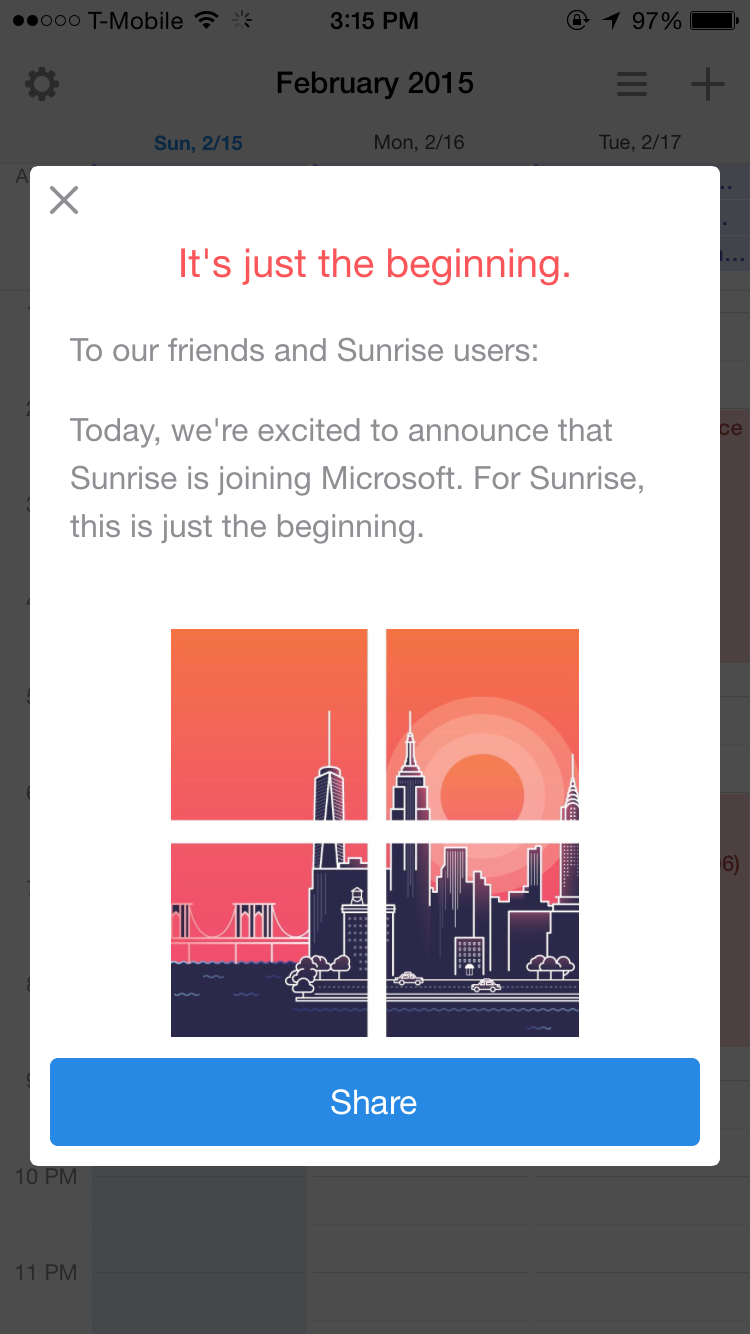
Screenshot of message from within the Sunrise Calendar iOS app, explaining that Sunrise is joining Microsoft

Screenshot of Sunrise Calendar

If you’re a Sunrise Calendar user, then you may be surprised, as well as excited to learn that Sunrise Calendar has been acquired by Microsoft – something that I found out about via a recent Sunrise app update. After updating, there was a message displayed on the app, which, when tapped, brought up the message seen in the screenshot above, which reads:

It’s just the beginning.

To our friends and Sunrise users:

Today, we’re excited to announce that Sunrise is joining Microsoft. For Sunrise, this is just the beginning.

Microsoft also posted a blog post on their website, written by Rajesh Jha, Microsoft’s Corporate Vice President of Outlook and Office 365, which reads, in part:

I’m pleased to announce that Microsoft has acquired Sunrise, provider of a next-generation calendar app for iOS and Android. We are making this acquisition because we believe a reinvention in the way people use calendars on mobile devices is long overdue. Our goal is to better help people manage and make the most of their time in a mobile-first, cloud-first world.

This is another step forward on our journey to reinvent productivity and empower every person and organization to achieve more. Today’s acquisition of Sunrise, our recent acquisition of Acompli, and our new touch-optimized universal Office apps for Windows 10 all exemplify Microsoft’s ambition to rethink the productivity category. Our goal is to create more meaningful, beautiful experiences in mobile email and calendaring across all platforms. And as you will hear in the video below, the creative talent and fresh thinking at Sunrise and Acompli will make a lasting impact on the Microsoft family as we seek to reinvent productivity.

With Sunrise now backed by Microsoft’s technical and monetary resources, as well as existing software, such as Microsoft Outlook, Office, Office 365, and others, it will be interesting to see how Sunrise will be integrated into the various Microsoft products, as well as how it will be developed further as a standalone app and website.

What are your thoughts on Microsoft’s acquisition of Sunrise Calendar? Are you a user of either the Sunrise Calendar iOS and/or Android apps or the Sunrise.am website application? Please feel free to post your thoughts, comments, and feedback in the “Comments” section below!

Using Your iPhone to Track Steps

Have you ever wondered how many steps you’ve taken or how active you’ve been throughout the day, but don’t have a pedometer or fitness tracker, like the Fitbit, to track and record this data? If you happen to be running iOS 8 on an iPhone 4s or later or on an iPod Touch 5th generation or later, you can easily track your steps, distance, and other interesting and useful health data, right from your iOS device using the built-in Health app.

Introduced in iOS 8, the Health app enables users to keep track of their health and fitness data, which can be either manually entered or pulled in from other apps, like MyFitnessPal, via Apple’s HealthKit tool. Users can then view this data from with the Health app, with the option to choose which information gets displayed on their Dashboard within the app.

For those users who carry their iPhone in their pocket throughout the day, they can use the Health app to track and view data on how many steps they’ve taken, something that one would have to use either a third-party app or fitness tracker for in previous versions of iOS. Users can also view data on how much distance they’ve walked or ran, as well as what the equivalent number of floors climbed would have been.

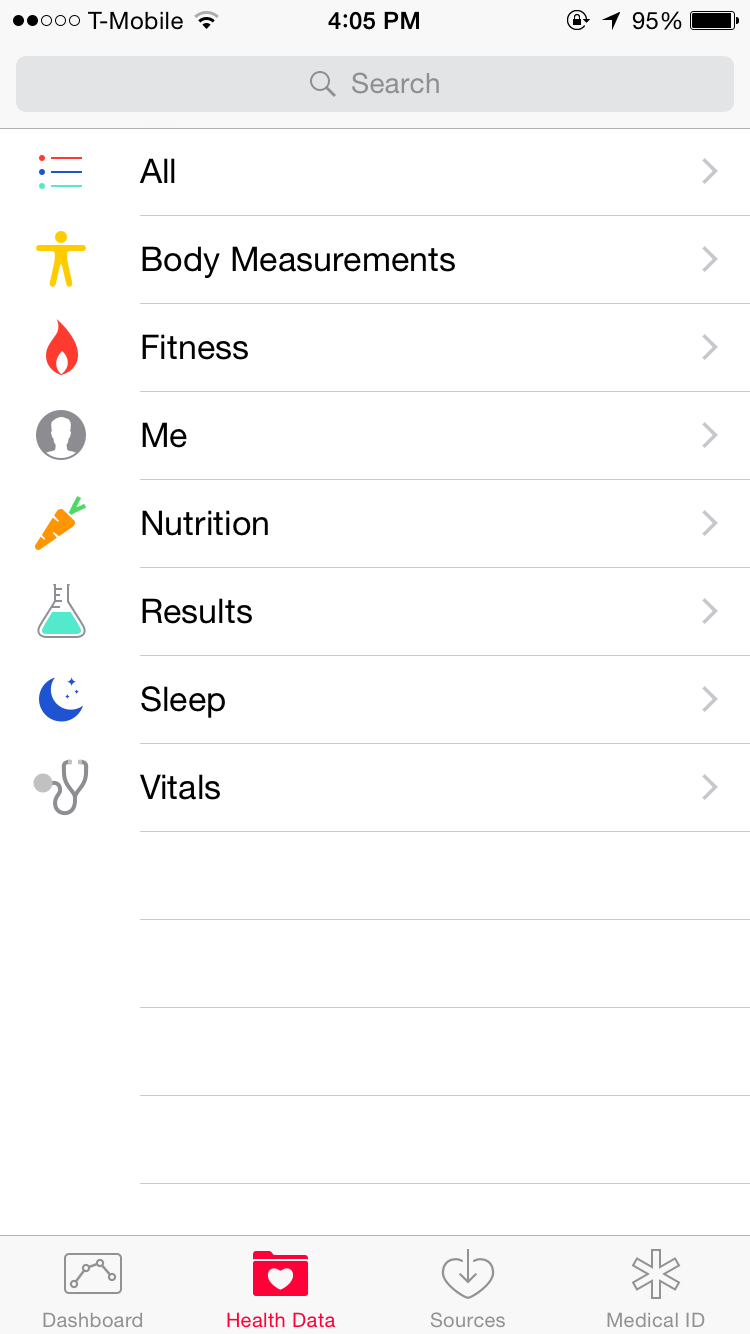
In order to view how many steps you’ve taken, you can do so by launching the Health app, where you should see buttons on the bottom of the screen, including “Dashboard”, “Health Data”, “Sources”, and “Medical ID”.

Tapping on the “Health Data” button will bring you to a list that contains various categories of health data that you can view and edit, from vital signs, to nutrition, to fitness.

The Health Data section of Apple's Health app

The Health Data section of Apple’s Health app

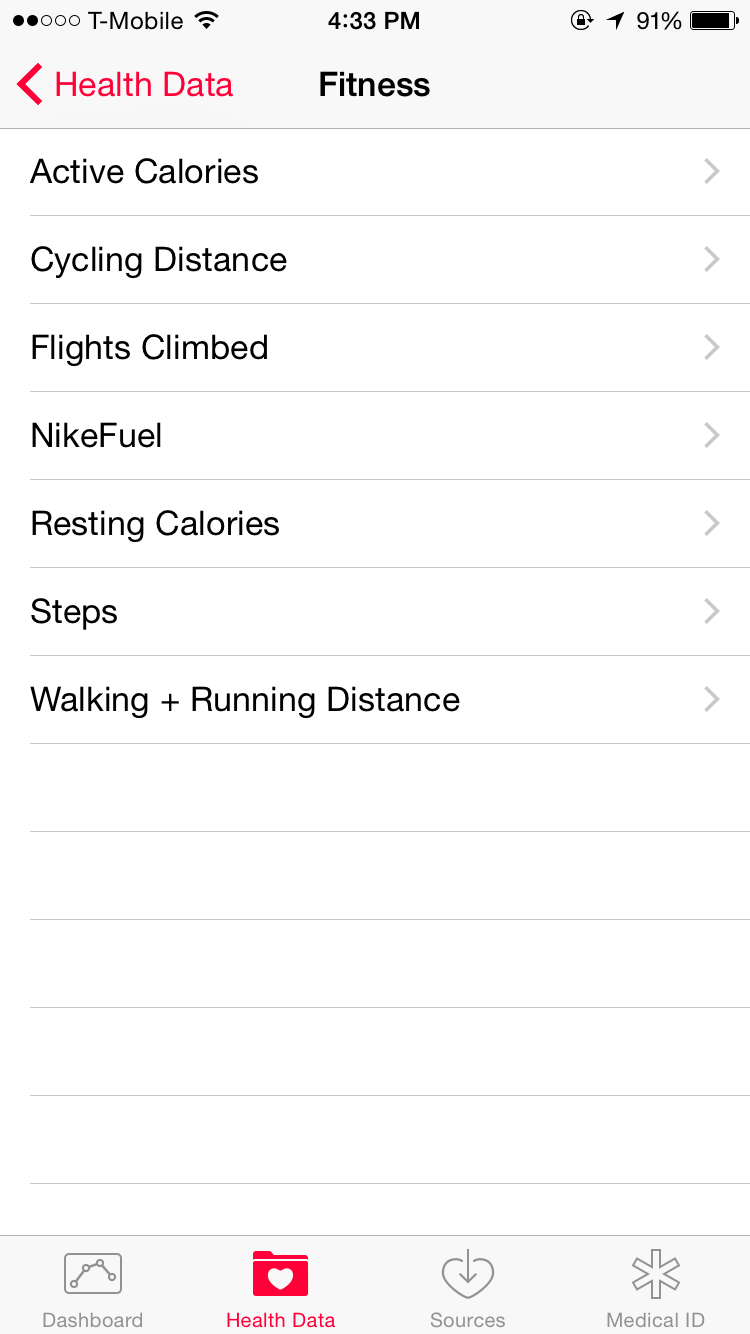
From the “Health Data” menu, you can tap on “Fitness”, which will give you the option to view various kinds of fitness data, including “Active Calories”, “Cycling Distance”, “Flights Climbed”, “NikeFuel”, “Resting Calories”, “Steps”, and “Walking + Running Distance”.

The iOS Health App's "Fitness" Categories

The iOS Health App’s “Fitness” Categories

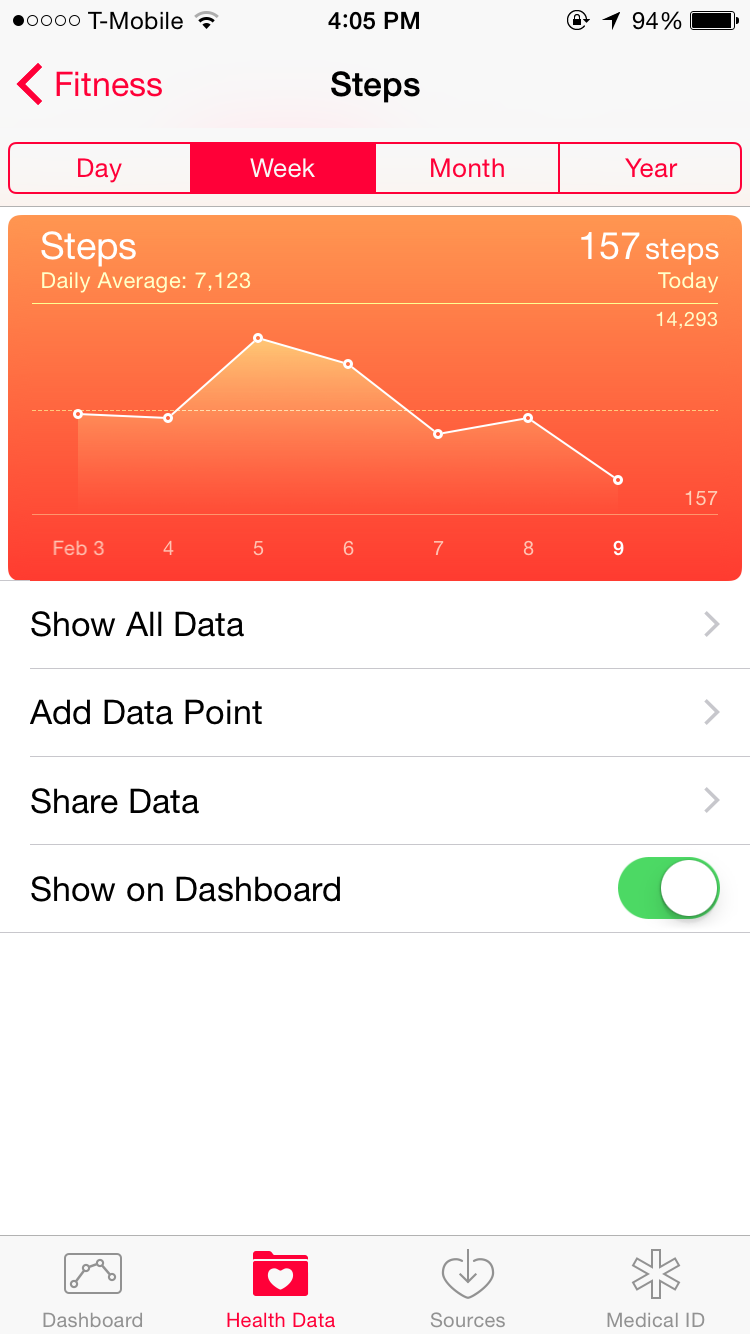
When you choose the “Steps” option, you should see a screen detailing the number of steps that you’ve taken over a time period of days, weeks, months, or the year, with the data in both numerical and graph form, allowing you to view the number of steps you’ve taken over the selected period of time.

Step data seen within the Health app on iOS 8

Step data seen within the Health app on iOS 8

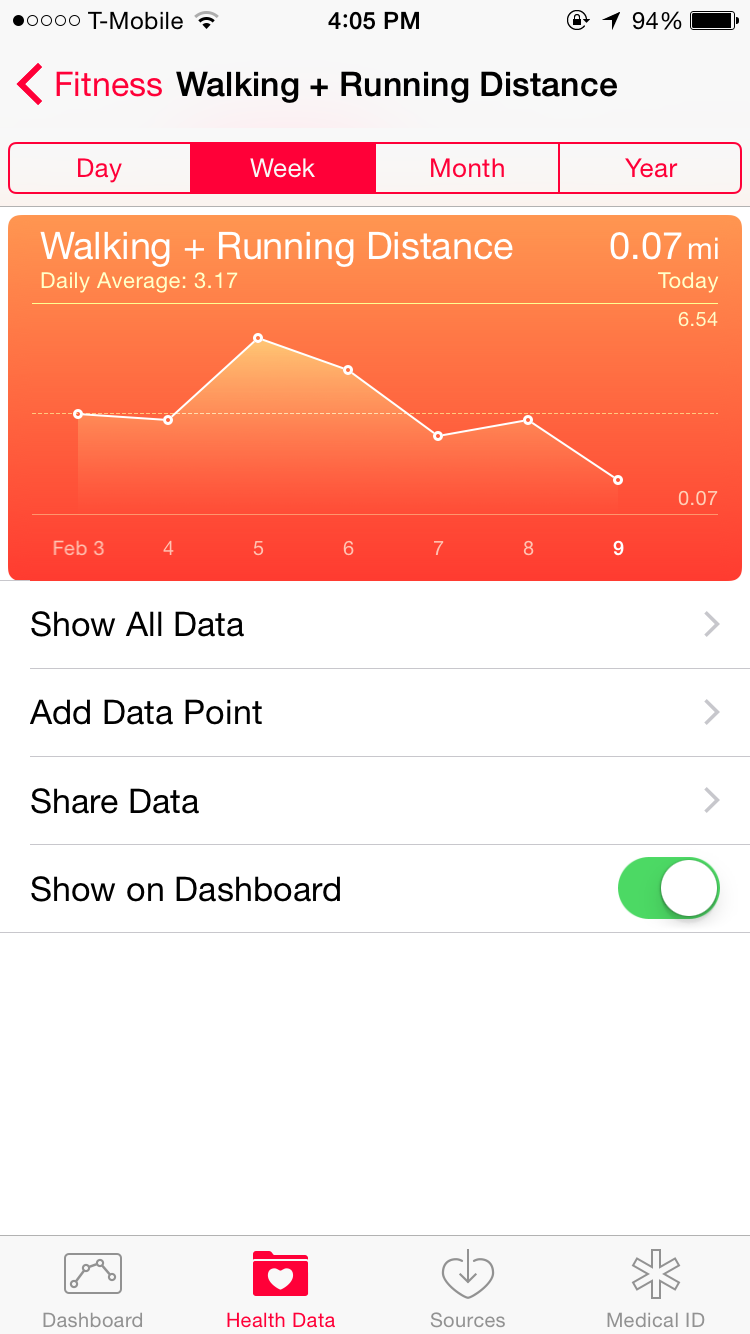
In order to view the distance you’ve walked or ran, you can select the “Walking + Running Distance” option from the “Fitness” menu, where you can view both numerical and graphical data in the same time-frames as the “Steps” option.

Health App's "Distance" Screen

Distance data seen within the Health app on iOS 8

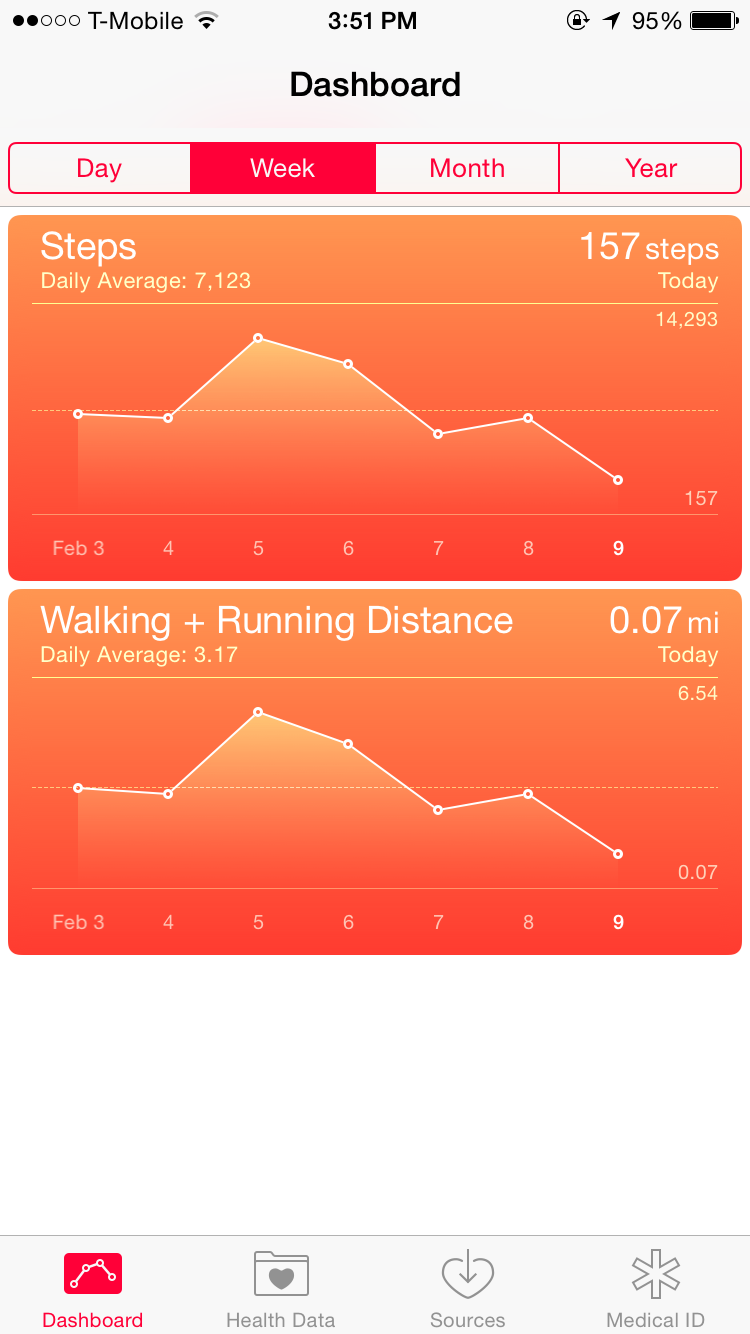
In order to make it easier to view both step and distance data, you can use the “Show on Dashboard” slider to add the desired data to the Health app’s Dashboard – that way you don’t have to traverse through the menus and options each time you’d like to view your data.

Health App Dashboard, displaying data on the number of steps taken and the distance traveled

Health App Dashboard

Tapping on the data from the Dashboard will take you to the same data and options page that you arrive at when you do so by traversing through the “Health Data” categories.

For more information regarding Apple’s Health app and HealthKit for iOS, you can check out this page from Apple’s support website, which provides information on the Health app in general, as well as what other functions you have access to with the app.

Have you tried using Apple’s Health app on iOS 8 for keeping track of your daily steps, distance, or anything else? What have your experiences been like? Please feel free to let us know in the comments section below! Also, please feel free to check out the TechnicalCafe YouTube channel for more tech news, tips, tricks, and tutorials!

Amazon Prime Air

Amazon, known for being one of the Internet’s most popular retailers, has recently reveled a new method of delivery, known as Amazon Prime Air, which is different than any shipping method seen before, from either online or brick-and-mortar retailers.

What makes Amazon Prime Air different than most shipping methods seen before is that this service will use flying drones to deliver packages to customers, with the goal of delivering packages to customers in 30 minutes or less.

Below is a video that describes the Amazon Prime Air service, that even shows an example of what a drone may look like in action.

However, due to FAA rules that are not yet in place, one should not expect to see the Amazon Prime Air drones flying around just yet. According to the FAQ on the Amazon Prime Air webpage, Amazon says “We hope the FAA’s rules will be in place as early as sometime in 2015. We will be ready at that time.”

As for the safety aspect of having drones flying around, delivering packages to Amazon customers, the aforementioned FAQ also states “The FAA is actively working on rules and an approach for unmanned aerial vehicles that will prioritize public safety. Safety will be our top priority, and our vehicles will be built with multiple redundancies and designed to commercial aviation standards.” It is good to know that Amazon is taking steps to help ensure the safety of those who may happen to witness a drone flying by, delivering an Amazon order to a customer.

The Amazon website does not appear to have any information about the pricing of a delivery that uses a flying drone, but it will be interesting to see if there is an extra charge, and if so, how much this charge will be, in order to have something shipped via an Amazon Prime Air drone. Though, the convenience of having something at your door in a half hour or less is something that I would guess many people would be willing to pay extra for!

While the Amazon Prime Air service is not quite yet ready (or allowed) to be rolled out, it is still quite an interesting concept and it will be interesting to see how it ends up working out. Though, the idea of ordering something from Amazon.com and having it at your doorstep in 30 minutes or less is pretty nice and probably something that one would like to have!

CryptoLocker Trojan

While listening to an episode of the computer security podcast, “Security Now!”, hosted by Leo Laporte and Steve Gibson on the TWiT Netcast Network, I found out about the CryptoLocker trojan, which has been pretty troublesome to those who’s computers happen to get infected with it.

CryptoLocker Background:

CryptoLocker is the name of a trojan horse that has recently surfaced, within the last few months, and has been causing some interesting issues for those who have been unlucky enough to have had their computers infected with this piece of malware, as it actually can encrypt some of the contents of a user’s hard drive, making it virtually impossible for them to access this encrypted data unless they choose to pay a ransom that has been set by the developers of the trojan.

Specifically, the CryptoLocker trojan encrypts the infected hard drive’s files using RSA public-key cryptography, with the only key available to decrypt the data being stored on the servers that control the CryptoLocker trojan. Making matters worse is that users must pay in order to have their files decrypted, with payment types such as Bitcoin or a pre-paid voucher, and users must make this payment by a specific deadline. (According to Bitcoincharts.com, the price of a Bitcoin at the time of this posting is equal to around $954.34 US dollars!)

Should a user not make the ransom payment by the set deadline, they may still have the option to get their data unencrypted, but the price will be higher than that which was set before the deadline expired.

Although it is possible to scan for and remove the actual CryptoLocker trojan, if it is activated, thus encrypting one’s files, before the program is scanned for and removed, any files that were encrypted will remain encrypted, so a user essentially has no choice but to pay the ransom, unless they have previously backed up their files and can restore them.

Prevention and Dealing with Infection:

Like many computer viruses and other malicious files and programs, it is possible to essentially prevent one’s computer from being infected with programs like CryptoLocker, simply by being security conscious and taking some basic precautions.

Since CryptoLocker can infected computers via an infected ZIP file, sent to the user in an e-mail attachment, it is important to be cautious as to what e-mails and attachments one opens, especially if they appear to be from an e-mail address that you have never seen before or that looks weird or suspicious.

Many spam e-mails (and those that are infected with viruses and such) may appear as though they are from legitimate sources, such as a school, bank, or even the e-mail provider itself, but looking at the e-mail address that the message was sent from can pretty much give away the fact that the e-mail was sent with malicious intent. This is especially true if the e-mail contains an attachment that is in either .zip or .exe form.

Additionally, one can help to keep their computer from getting infected by a number of viruses and other malicious files or programs by running frequent antivirus, antispyware, and/or antimalware scans. Microsoft Security Essentials is an antivirus program, created by Microsoft, that is available as a free download from the Microsoft website, and can help to prevent, as well as pick up and remove, many viruses and other unwanted or harmful programs and files.

MalwareBytes is a free antimalware program, which has the option to be upgraded to a premium version (though the free version works well), and is another way that users can help to keep their computers free from infection by running frequent scans. MalwareBytes can be downloaded from MalwareBytes.org, where the premium version of the program can also be purchased ($24.95 for a lifetime license for one computer).

Example of Infection:

CryptoLocker actually managed to infect the Swansea, MA police department, forcing them to pay $750 in Bitcoins in order to decrypt the data that the trojan had encrypted on them.

In an article from the IBTimes.com website, which talks about the aforementioned infection of the Swansea, MA police department, it is stated that “According to the Security experts and the U.S. Computer Emergency Readiness Team urge people afflicted by CryptoLocker not to pay the ransom, but instead report the incident to the FBI’s Internet Crime Complaint Center. Users should regularly back up important files on external hard drives” (Ryan W. Neal).

However, if one happens to have important or necessary files stored on their computer that have not been backed up and have been encrypted by the CryptoLocker trojan, paying the ransom is the only way to get the files back.

This goes to show that even law enforcement agencies are susceptible to their computers becoming infected with viruses and other malicious files and programs, and that everyone should be careful of what is downloaded and allowed on their computers, so as to prevent things like this from happening.

For more information about the CryptoLocker trojan, you should check out this article from Wikipedia, which is where most of the information regarding CryptoLocker in this post was found, along with additional information.

Five Year Giveaway Winner!

About a month ago, it was the fifth year anniversary of the day that I registered the TechnicalCafe domain name at GoDaddy.com.

In celebration of TechnicalCafe’s fifth birthday, I decided to do a giveaway to someone who comments on either the TechnicalCafe blog or YouTube channel, with the winner being chosen randomly.

As for the prizes, the winner would get to choose from either a $25 Amazon.com gift card and a $25 iTunes gift card, depending on what they wanted. Additionally, the winner will receive a choice of either a TechnicalCafe t-shirt, hat, or other item from the VistaPrint store.

Well, about a week ago, the winner was chosen randomly in a YouTube video, and is Epic, a user who commented on the TechnicalCafe blog post announcing the giveaway.

Congratulations to Epic on being chosen as the winner and thank you to everyone who entered and participated in the giveaway!

Also, thank you to everyone who watches, subscribes to, and takes the time to comment on the TechnicalCafe YouTube channel and videos, as well as to those who read the TechnicalCafe blog. I appreciate it!

– Jamie